
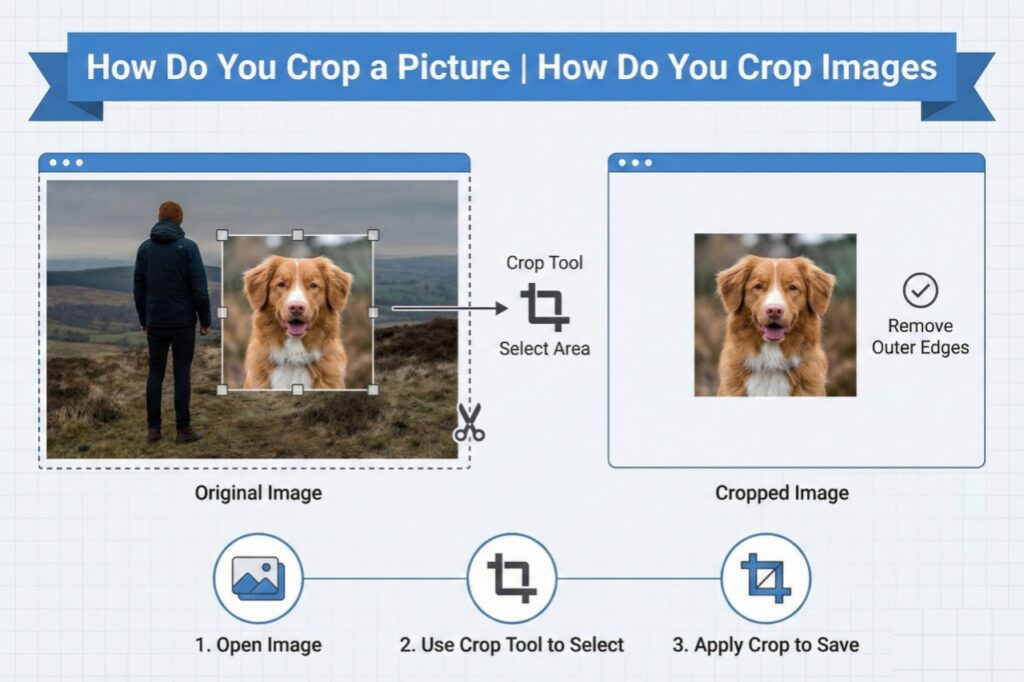
Hello friends! Today we’re going to talk about a skill that everyone needs – whether you’re a student, a business owner, a social media user, or someone who manages family photos at home. Yes, today we’ll learn “how do you crop a picture,” “how do you crop images,” and “how do you crop a photo” – everything about photo cropping! And best of all, we’ll also tell you about a website where you can easily do this for free.
What is Cropping?
Simply put, cropping means cutting out the part of your picture that you want to keep. Like taking only your photo from a group photo, or separating the beautiful part of the sky from a landscape photo. It’s a basic editing skill that can make your photos even better.
Benefits of Cropping Images
- Increased Focus: Only what you want to show will be visible.
- Improved Composition: The balance of the photo is enhanced.
- Correct Size: You get the right size for social media or printing.
- Removal of Unwanted Elements: Unwanted people or objects are removed from the photo.
How to Crop? (How Do You Crop a Picture/Image/Photo?)

Cropping on Different Platforms:
- From a Mobile Phone (Easiest Way)
- Android Phone: Open the photo in the gallery → Tap on the edit option → Select the crop tool → Adjust as needed → Save.
- iPhone (iOS): Go to the Photos app → Click on Edit → Select the crop icon (the one with two corners) → Adjust the frame → Press the Done button.
2. From a Computer/Laptop
- Windows: Open the photo in the Photos app → Click on “Edit & Create” → Select “Edit” → Adjust with the crop tool. • Mac: Open the photo in the Preview app → Select the crop icon (the one with two corners) in the toolbar → Make your selection → Press Enter.
3. Online Websites (Without Installing Software)
There are many websites that offer free cropping features. One of the best and easiest websites is:
picsizereducer.com – Your free and easy solution!
Friends, if you’re wondering what the simplest answer to “how do you crop images” is, I suggest you try the picsizereducer.com website. This website is specifically designed for cropping images and reducing image size.
What can you do on picsizereducer.com?
- Crop for free: You can crop pictures without paying any money or registering.
- Reduce image size: Reduce the size of photos for websites or emails.
- Maintain quality: The photo quality remains the same even after cropping.
- Change format: Convert to formats like JPG, PNG, WEBP.
- Batch processing: Crop or resize multiple photos at once.
How to use picsizereducer.com? (Step by step)
- First, open picsizereducer.com in your browser.
- The website’s homepage is simple and user-friendly. You will see a button like “Upload Image” or similar.
- Click on it and select the photo you want to crop from your computer or phone.
- Once the photo is uploaded, the editing tools will appear.
- Select the crop tool and select the area of the photo you want.
- You can also set the ratio (such as square, 4:3, 16:9).
- Once cropped, click on the “Download” or “Save” button.
- Your cropped photo will be downloaded!
How easy is that? Without any technical knowledge, without downloading any software, you learned how to “crop a picture” in minutes.
Other Free Platforms
If you want to explore more options, you can also try these:
- Canva – With a drag-and-drop interface and professional templates.
- Fotor – Great for basic editing.
- Pixlr – Gives a Photoshop-like feel, online.
- Adobe Express (formerly Spark) – For quick editing.
- Snapseed (mobile app) – Google’s free and powerful app.
Pro Tips for Cropping Images
- Rule of Thirds: Use a grid that divides the photo into 9 equal parts. Place the main subject at the intersection points of the grid.
- Keep the Horizon Straight: In landscape photos, make sure the horizon is straight.
- Negative Space: Sometimes, empty space also improves the composition.
- Aspect Ratio: Choose the ratio according to where you will be using the photo (e.g., Instagram, Facebook, print).
Conclusion – Friends, learning “how to crop images” has become an essential skill in today’s digital age. Whether you’re posting photos on social media, creating presentations, or organizing your personal photos – cropping makes your work easier. And websites like picsizereducer.com make this task even simpler.
So, are you ready? Choose a photo today, go to picsizereducer.com, and enjoy cropping! Remember, practice makes perfect. The more you do it, the easier it will become.
Happy cropping! And if you have any questions, you can ask in the comments.